 en
en Italian
 German
 French
 Spanish
 Russian
The MP3 tag editor is a tool for editing tags and for organizing collections of MP3, WMA, WAV, FLAC, APE, OGG Vorbis, AAC, WavPack, MPC/MPP/MP+, and M4a/MP4 files. Using mp3Tag Pro, you can easily process thousands music files simultaneously. For example, you may want to import tags from a database, or extract ID3 info from filenames.
Filenames and folder names may contain significant amount of information about files. Consider the following example:
C:\Music\Hard Rock\Deep Purple\1974 Stormbringer\09 - Soldier of Fortune.mp3
Here, folder names and the filename contain information about genre, artist, year, album, track number, and title. If our ID3 tags are empty, we can populate them quite easily! The corresponding format would be:
%G\%A\%Y %L\%# - %T
Let’s see how it goes in general. Select files, click “Generate tags” on the toolbar of “ID3 tags” area:

A new window pops up. Make sure that the “Tags generator” tab is selected.
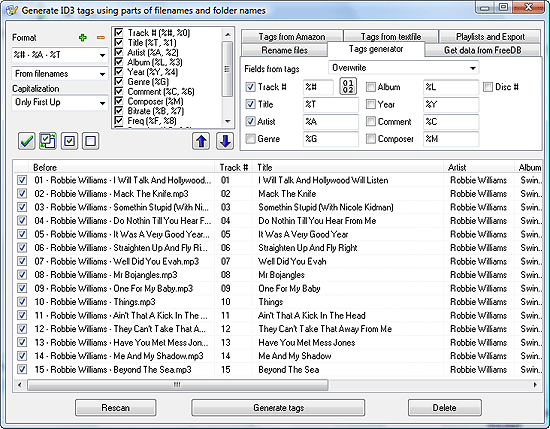
In the left upper corner of the window, there is a couple of dropdown lists labeled “Format”. The second (lower) dropdown list states that we are generating tags from filenames. The program can also generate tags from existing tag fields. This latter may be useful, if your files have all kinds of information in the single “Title” field (which is not unusual).
Directly under the “Format” label, there is a dropdown list with ‘%’ symbols followed by letters. This is the format string. It tells the program how filenames (and folder names) should be read, i.e. which part goes into a certain ID3 tag field.
The “Format” field is editable, which means that you can compose it from variables according to the information in your filenames. This makes mp3Tag Pro highly flexible.
Most popular formats are pre-defined. Registered users can add custom formats to the list.
On the right pane, take a look at the “Fields from tags” list. It defines what the program should do with existing ID3 tags. It can overwrite everything, overwrite empty fields only, or don’t change existing tags at all.
Below, there are names of ID3 tag fields with the corresponding variables and checkboxes. If you select to overwrite existing tags, only checked fields will be overwritten. For instance, if you want to overwrite a single field (say, title), set mp3Tag Pro to overwrite existing tags and uncheck all the other fields.
See results in the preview area. If everything is okay, click “Generate tags” in the bottom of the window to save changes to the files.
Alternatively, it is possible to download missing ID3 tags from Amazon, FreeDB, MusicBrainz, Discogs.


