 en
en Italian
 German
 French
 Spanish
 Russian
If ID3 tags of your music files are incomplete or missing, the MP3 tag editor can download information from internet services, like FreeDB, Discogs, MusicBrainz, Amazon. It is also possible to generate tags from filenames and folder names.
However, there is another powerful feature that you may find quite valuable for large collections, especially if you work with music professionally. This feature allows importing tags from a database. Thousands audio files can be processed in a single step.
mp3Tag Pro can read tags from CSV and TSV files. Those are usual text files that follow simple rules. Most applications (including MS Excel, MS Access etc.) can export data into these formats, so the feature can be used with virtually every database.
A typical CSV file contains a number of lines that look like:
filename;title;artist;album;year;genre;comment;
In the above example, values are separated by semicolons. They can also be separated by commas and tabs (which is where the names of the formats come from: CSV – comma separated values, TSV – tab separated values). For many reasons, semicolon is usually the best delimiter.
Now let’s see how mp3Tag Pro uses CSV files.
Imagine that you have a group of files with no information in tags and filenames like:
01.mp3
02.mp3
etc.
Fortunately, you also have a database of tags saved to a CSV file:
01.mp3;Kylie Minogue;Wow
02.mp3;Britney Spears;Piece of Me
etc.
The only question now is: how to import the information to ID3 tags?
Select the files in mp3Tag Pro. On the toolbar of “ID3 tags” area, click “Generate tags”:

In the new window, click the “Tags from textfile” tab:
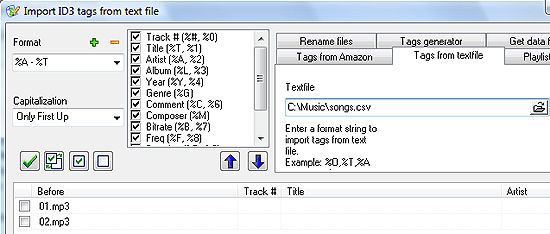
On the tab, you will find the “Textfile” field. Enter the complete path to your text file into it, or click the ‘open’ button on the right to get a usual open dialog.
In the left upper corner, enter a format that would match information in your CSV file. For the previous example we would need this format:
%O;%A;%T
Results are immediately shown in the preview area:
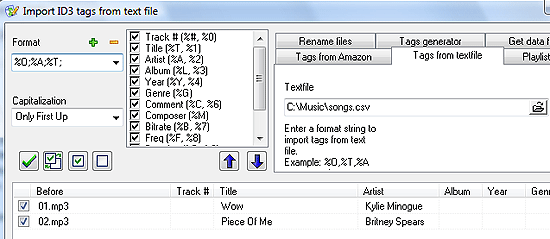
Variables in the above format string have the following meaning: ‘%O’ – ‘filename’ (formerly ‘Old filename’), ‘%A’ – ‘Artist’, ‘%T’ – ‘Title”.
The order of variables in the format string depends on how the order of values in the text file. For example, let’s swap artist and title values in our text file:
01.mp3;Wow;Kylie Minogue
Now we need another format:
%O;%T;%A
You can use every other variable to tag your files, if necessary.
In our example, we used semicolon as the delimiter. For comma-separated files, use commas in the format string. Tab-separated values can be extracted with \t as the delimiter in the format string.
This method of tagging can be used for files from multiple folders.
Sometimes you may want to import tags to a different set of files, with different filenames. mp3Tag Pro doesn’t allow doing that directly (it’s not safe, because you can tag wrong files that way), but if you absolutely must do that, there is a workaround:
- Select all files to be tagged. Export tags to a CSV file.
- Open the exported file in a spreadsheet tool (MS Excel or similar).
- Copy the column with filenames.
- Open the file that you want to import tags from in the spreadsheet program.
- Replace or insert the column with filenames from the exported file.
- Save the file. Proceed with tagging, like described above.
You can export ID3 tags to create a backup. If necessary, you can always import tags back, like described above.


