 en
en Italian
 German
 French
 Spanish
 Russian
mp3Tag Pro is a powerful MP3 tag editor that can rename music files and fill out tag fields, such as title, artist, album etc. If you want to back up existing tags or extract them for further processing, you can use the export tags feature.
Select audio files in mp3Tag Pro. Click the “Export/Playlists” button on the toolbar in the “ID3 tags” area:

A new window will be shown. In the list of tag variables, check all fields that should be exported:
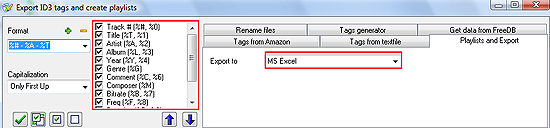
On the “Playlists and Export” tab, you can see a single “Export to” field with a dropdown list of values. Tags can be exported to MS Excel, to TSV or CSV files. The latter two formats are simple text files (comma separated and tab separated), and you can use them to import tags to a different group of audio files, or to restore tags later, if needed.
Click the “Save playlist or Export data” button to complete exporting tags.


