 en
en Italian
 German
 French
 Spanish
 Russian
The MP3 tag editor can process tags of many audio formats: MP3, FLAC, APE, M4a, WMA, OGG etc. As these formats have been designed to store music (which includes songs), their tags have special fields for lyrics and cover art.
In order to find and download lyrics, mp3Tag Pro will need correct information in the title and artist fields.
If you see no Lyrics area, check “View” – “Show lyrics”, or press “Ctrl” + “L” on your keyboard. Select an audio file and click the “Download lyrics” button on the toolbar:

mp3Tag Pro will perform a search, and a few seconds later some text will show up in the lyrics area:
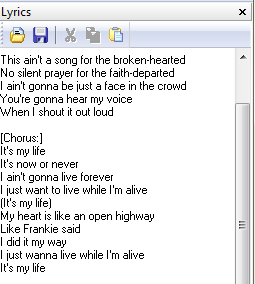
The program includes templates for the most popular sites devoted to lyrics, so it can extract texts without additional information. If lyrics is downloaded from a site without template, there will be headers and footers included in the text. They can be removed manually, by editing the text directly in the lyrics area.
To activate templates, check the corresponding box in the “Options” menu.
It is possible to skip a site and download lyrics from another one (mp3Tag Pro has a considerable set of templates, so if you get a text that is hardly readable, it may be a good idea to skip the site). After downloading lyrics, the “Next” button becomes active on the toolbar next to the “Download lyrics” button. Click it to download lyrics from another site.
To download lyrics for a group of files, highlight the files (for example, by using the “Select all” button) and click the “Download lyrics” button. mp3Tag Pro will search, download and save the first result for every selected file.
The trial version of mp3Tag Pro can download 50% of lyrics. Moreover, only registered users benefit from updated templates.
As we have already mentioned, some fields should be not empty to make downloading of lyrics possible. Information about title and artist (and much more) can be extracted from filenames. It is also possible to download such information from FreeDB, Amazon, Discogs, MusicBrainz.
Save Lyrics
If you download lyrics for a single file, it is not saved automatically. In order to save the text that you see in the lyrics area, click “Save” on the toolbar (or simply press F2):
If you want lyrics to be saved automatically, just check the corresponding box in the “Options” menu.
Downloaded lyrics can also be saved as a separate text file. To do so, click  on the toolbar in the lyrics area.
You can enter or edit lyrics manually, insert it from a text file (click  in the lyrics area) or from the clipboard, or drag and drop a text file to the lyrics area.


