 en
en Italian
 German
 French
 Spanish
 Russian
Movienizer can download information about movies and persons from a number of various online databases. It also supports custom fields, playing movies in the built-in or in an external player, marking movies as loaned in its loan manager, quick searching etc.
To customize, or adjust behavior of all these features, you can use the Options menu.
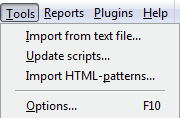
In the main window, click “Tools” – “Options”.
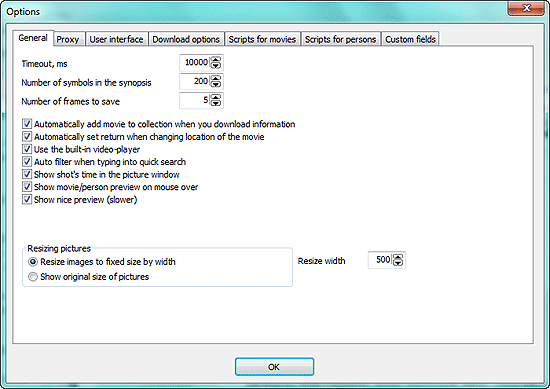
“Script for movies” and “Script for persons” tabs are discussed in the section about online databases. For information about the “Custom fields” tab please refer to the section about custom fields. We discuss download options separately.
If you must use proxy to access the internet, fill out required fields on the “Proxy” tab.
On the “General” tab, there are a few options.
- “Timeout, ms” – defines how long the program should wait for a remote server to respond. Sometimes online databases are busy processing requests and may reply with some delay, or there might be a delay due to your local network problems. In such cases, increasing the value may be necessary for successful downloads.
- “Number of symbols in the synopsis” – defines the maximum number of symbols (including spaces) in the movie description both on the movie page and in reports. The description is truncated. On the movie page, you can expand the description by clicking “Show more”.
- “Number of frames to save” – defines how many shots the program should take from the movie when you are adding snapshots and use the “Several shots” button in the player.
- “Automatically add movie to collection when you download information” – the program will automatically add every movie that you download info about to your collection (the “In collection” box will be checked after every download). This may be convenient for those who add only movies they own. You may want to uncheck the option if you are creating wish lists.
- “Automatically set return when changing location of the movie” – sets return date in the Loan manager, if you change location of the movie.
- “Use the built-in video-player” – plays movies in the built-in player if you click the play button on the toolbar. Alternatively Movienizer can start movies in your system’s default player.
- “Auto filter when typing into quick search” – interactive quick search field. If unchecked, the program searches only after you hit Enter on your keyboard.
- “Show shot’s time in the picture window” – shows when the particular shot has been taken.
- “Show movie/person preview on mouse over” – shows a popup box with a cover/photo and some summary about movie/person.
- “Show nice preview (slower)” – when checked applies styles to the list of movies/persons. Works a bit slower than the standard preview.
- “Resizing pictures” – you can define whether you want to resize pictures. Some downloaded pictures may be too big to fit your screen (rare), or simply too different in size.


