 en
en Italian
 German
 French
 Spanish
 Russian
After you find duplicate files with Music Duplicate Remover, there are several options. You can:
- Preview duplicates by listening to them.
- Sort duplicates in order to keep important files and remove only unwanted duplicates.
- Delete duplicate files in a single click.
- Copy or move duplicates to a folder of your choice.
The latter option may be useful, if you’d like to keep duplicate files in some folder and remove them later.
The buttons for copying and moving duplicates are shown on the toolbar of the duplicate list:
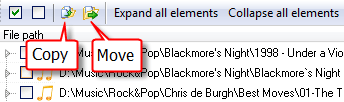
After you click one of the buttons, the program will ask you to choose a folder to copy or move the duplicates to.
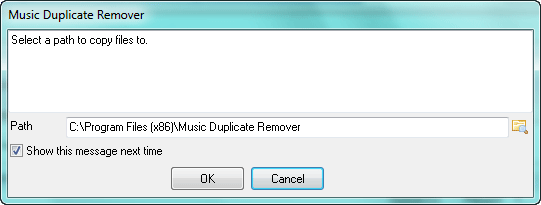
You can uncheck the “Show this message next time” box to avoid showing this dialog in the future. Files will be moved/copied to the previously selected folder. To start showing the dialog again, check the corresponding box in “Settings“.


