mp3Tag
MP3 Tag Editor and Music Organizer
AudioConverter Studio
Audio Formats Converter and CD Ripper
MIDI Converter Studio
Convert MIDI files to WAV, MP3, OGG, WMA
Visual MP3 Splitter & Joiner
MP3/WAV splitter, MP3/WAV joiner
Movienizer
Movie organizer (completely free software)
MP3 Recorder Studio
Sound Recorder to MP3 and WAV
Free M4a to MP3 Converter
M4a, AAC Audio Converter (completely free software)
Media Catalog Studio
Media Organizer and Collection Manager
iPod Video Converter
Convert AVI to iPod movie format

Read what users think about our software:

"I've been using your great tools to convert CD audio books into MP3 files so my dyslexic son can listen to them on an MP3 player with no moving parts. The tag editor and splitter/joiner make it easy to handle the often chaotic file naming and tagging of ausio book tracks, and the converter was very useful in changing WMA format files into MP3s for joining and tagging.

Earl Hughes
MP3 Recorder Studio
Download MP3 Recorder Studio - 2 MB
Buy now!

Recording Devices

MP3 Recorder Studio can record sound from any source, if the corresponding feature is supported by your system. It is possible to call recording controls directly from the program.

On the main window, click "Splitting and Recording Options" tab.

Tabs

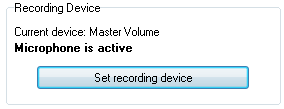
Content of the window's lower part changes. Find "Recording Device" area and click "Set recording device" button.

Recording device

System recording controls will appear. Select the device you need to capture sound from, make sure that it is on, set is as default:
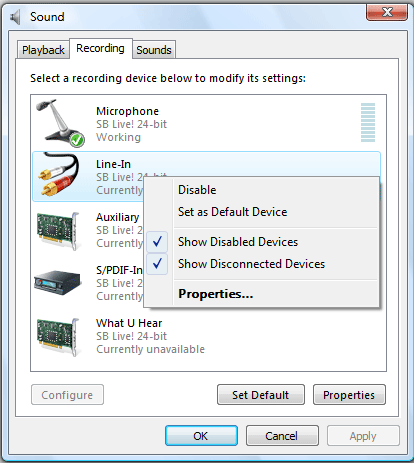
Right-click to get context menu, check to show disabled and disconnected recording devices

To capture all sound that you hear on your speakers, use "Stereo mix" or "What U Hear" device.

If not all devices are listed, right-click the list and make sure that "Show Disable Devices" and "Show Disconnected Devices" are checked.

Here you can set microphone as a single recording device. However, if you need to mix sound from microphone with other sounds on your system, read this section.