 en
en Italian
 German
 French
 Spanish
 Russian
Free M4a to MP3 Converter is able to convert M4a, AAC, MP4, M4b, 3GP audio files to MP3 and WAV formats. By default the program puts converted files into the same folder where your input files are stored. If you need to put converted files into a different folder, switch from “Input folder” to “Specify folder” in the lower part of the window:
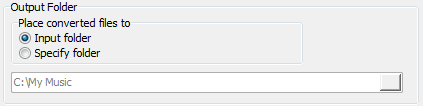
Then enter a path, or click the folder icon on the right and browse to the folder that you want to use.


